Migrate from Autobuilds
This guide explains how to migrate your Docker Hub Autobuilds setup to Continuous Integration (CI) workflows, focusing on GitHub Actions and Bitbucket Pipelines as these are the built-in CI services for the two version control services supported via Autobuilds.
Step 1: Create access tokens
To grant your CI workflows the ability to pull and push images to and from Docker Hub, you first need to create access tokens:
For a personal repository: Create a Personal Access Token with Read & Write permissions.
For an organization repository: Create an Organization Access Token with the following permissions:
- Read public repositories
- Image Pull on any private repositories that the build needs to pull from
- Image Push on the repository that the built image will be pushed to
The same token can be used for all CI workflows under the account's namespace provided it has adequate permissions to all relevant Docker Hub repositories.
Store the token securely in a password manager or your CI/CD platform's secrets manager. Never commit tokens to source code repositories.
Step 2: Extract your Autobuilds configuration
For each Docker Hub repository currently configured to use Autobuilds, you need to extract its configuration to set up your CI workflows to duplicate the existing functionality. The only way to extract the configuration is via the Docker Hub web interface.
Sign in to Docker Hub.
Navigate to your repository by going to My Hub > Your namespace > Repositories > Your Repository.
Go to the Builds tab and select Configure automated builds.
If there is no existing build configuration, then this repository is not configured for Autobuilds.
Note the following configuration details:
Source Repository: The GitHub or Bitbucket repository. The organization is the namespace and the repository is the repository name. This is where you need to add your workflow.
Autotest: If Autotest is enabled for Pull Requests (either internal only or internal and external), then extra steps are needed in your workflow to run the Autotest step.
Repository Links: Not supported and can be ignored. If chain builds are required, see the documentation for your CI service on how to chain builds together.
Build Rules: Specify the triggers, tags, and paths of your builds. Ignore any entry where Autobuild is toggled off.
Build Environment Variables: User-defined variables injected as environment variables into your build. You need to add these to your workflow. If the environment variables contain secrets, add them to your CI service's secrets manager. Then update your Dockerfile or build scripts to reference these secrets using your CI platform's syntax. See your CI service documentation on how to handle secrets.
Example configuration
The following image shows an example Autobuilds configuration.
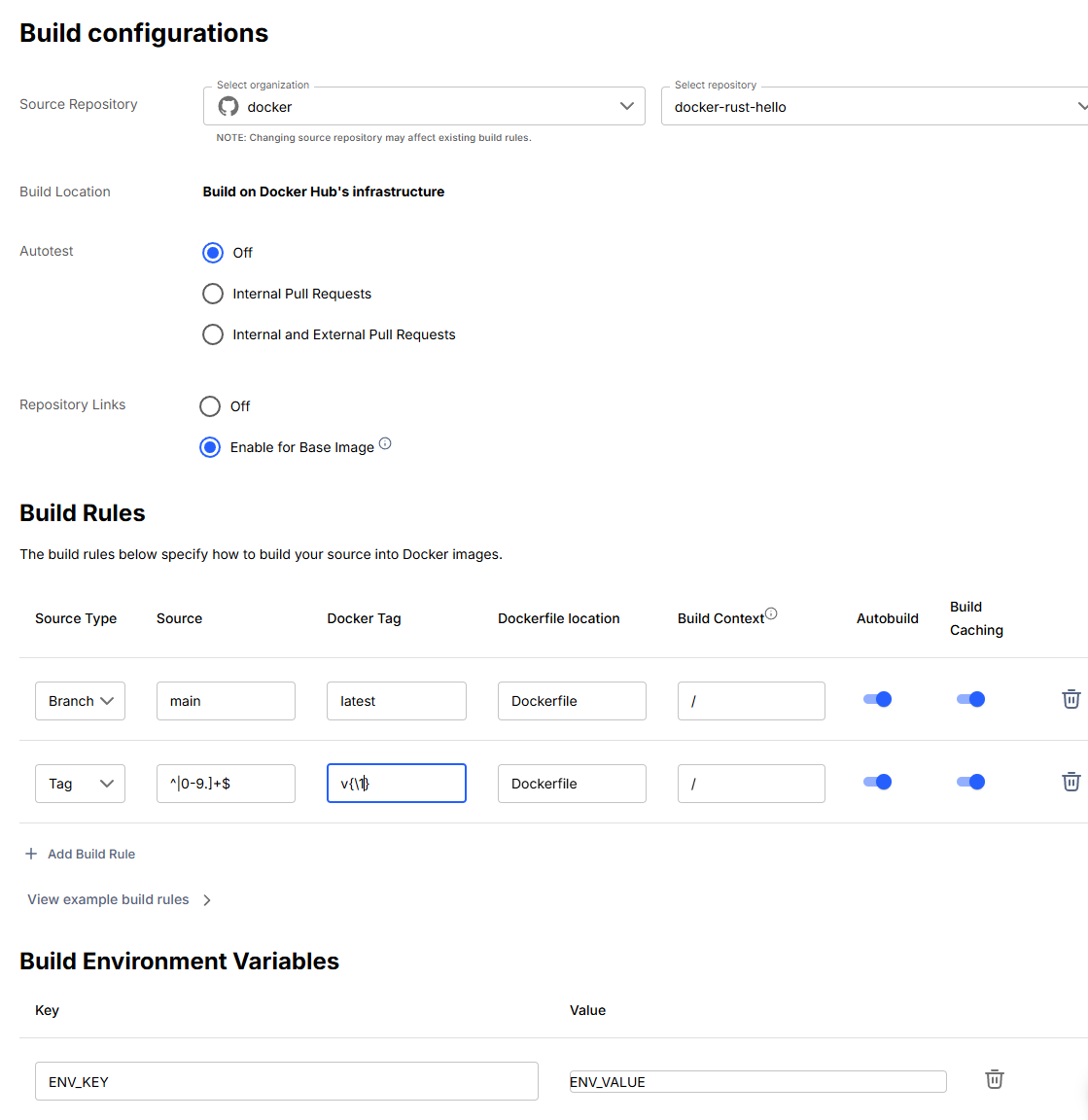
Based on the pictured example, you would note the following items for this Autobuilds configuration:
- Source code repository: GitHub repository
docker/docker-rust-hello - Autotest: Disabled
- Build rule 1: Build and push the image with tag
latestwhen a new commit to themainbranch is detected. The Dockerfile is at./Dockerfileand the build context is the root of the cloned code. - Build rule 2: Build and push the image with tag
v{\1}when a new commit to a tag matching the regex^v([0-9.]+)$is detected. The Dockerfile is at./Dockerfileand the build context is the root of the cloned code. - Environment variable: Key
ENV_KEYwith valueENV_VALUE
Step 3: Migrate to your CI/CD platform
Select the tab that matches your source code repository hosting platform.
If your source code repository is hosted on GitHub, see the Docker Autobuilds example repository.
All files except those under the .github/workflows directory are for example
purposes only.
The repository's readme details how to migrate from Autobuilds to GitHub Actions using one of the two provided workflows:
- The
simple-buildworkflow builds and pushes a Docker image to your Docker Hub repository. - The
full-autobuildsworkflow contains all the steps commonly used within an Autobuilds run, including building, tagging, running Docker Compose tests, and running optional bash hook files.
Steps to migrate
Follow the instructions in the example repository readme to configure a CI GitHub Action workflow in your GitHub repository.
The workflows contain comments on what each step does and where changes should be made. Important changes to make include:
- Set the
DOCKER_REPOSITORY_NAMEenvironment variable to the full name of your Docker Hub repository - Set your image tagging policy
- Set the workflow triggers
Links to relevant documentation are provided in the readme and the workflow comments.
- Set the
After you have completed migrating to GitHub Actions, delete the build configuration from your Docker Hub repository:
Navigate to the repository's Builds tab.
Select Configure automated builds.
Select Delete Build Configuration.
If your source code repository is hosted on Bitbucket, see the Docker Autobuilds Bitbucket example repository.
All files except the bitbucket-pipelines.yml file are for example purposes only.
The repository's readme details how to migrate from Autobuilds to Bitbucket
Pipelines using the provided example bitbucket-pipelines.yml configuration
file.
The pipeline example contains three separate pipelines:
branches/main: Shows how to build, test, and push an image on changes to a specific branchtags/*: Shows how to build, test, and push an image on tag pushes, including tagging the image the same as the Git tagpull-requests/*: Shows how to build and test, but not push, an image from a pull request
Steps to migrate
Follow the instructions in the example repository readme to configure a Bitbucket Pipeline in your Bitbucket repository.
Comments in the pipeline configuration explain what each part does and where changes need to be made. Important changes to make include:
- Set the
DOCKER_REPOSITORY_NAMEenvironment variable to the full name of your Docker Hub repository - Set your image tagging policy (see where the
DOCKER_TAGvariable is set in each pipeline) - Set the pipeline triggers for branches, tags, and/or pull-requests
Links to relevant documentation are provided in the readme and the workflow comments.
- Set the
After you have completed migrating to Bitbucket Pipelines, delete the Build configuration from your Docker Hub repository:
Navigate to the repository's Builds tab.
Select Configure automated builds.
Select Delete Build Configuration.